

Submitting Essay Answers
Students compose written responses using an HTML editor embedded in the lab report webpage.
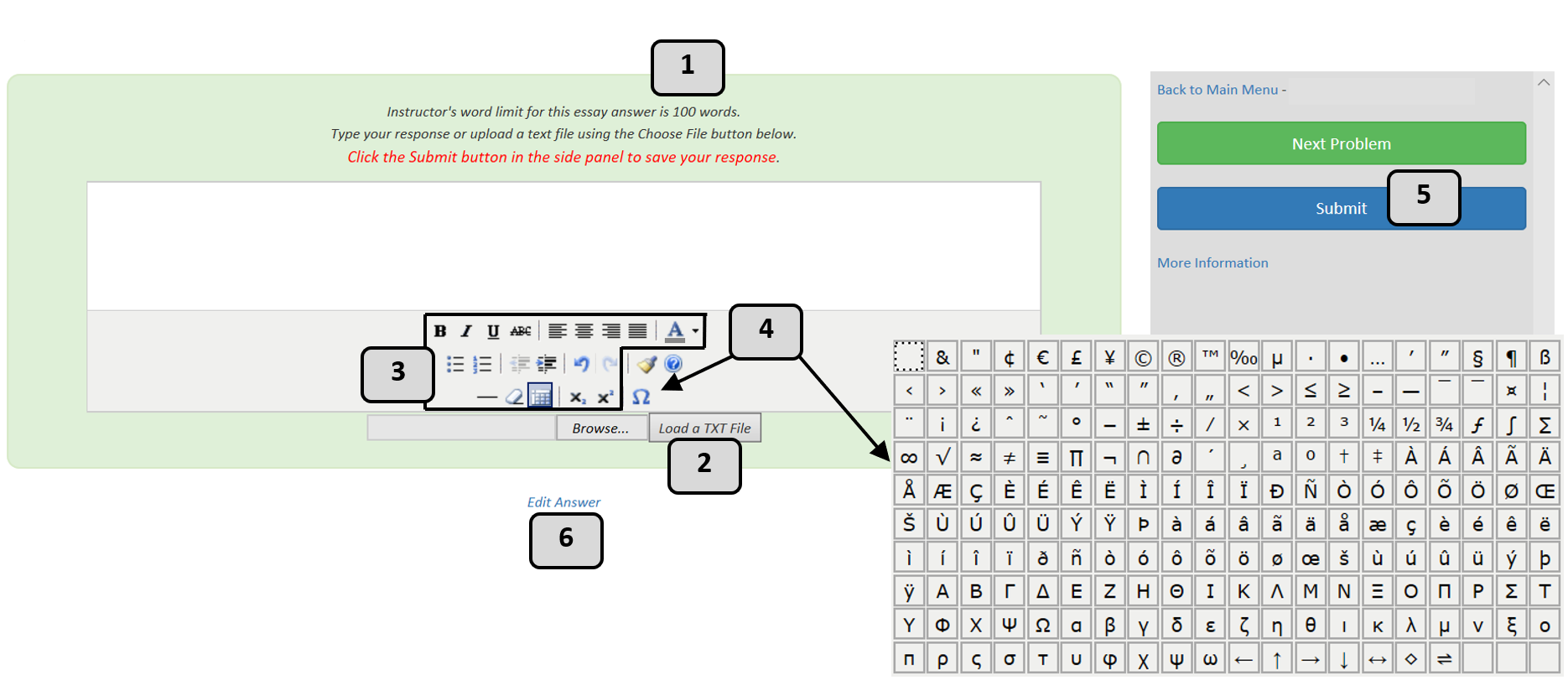
Key Features:
The numbers in the image above correspond to the numbers in the list below to give additional information about the features students can employ while composing their answer.
- Word limits (i.e. 100) can be can be set to encourage concise answers.
- Text file upload: Students can load .txt files into the editor using the Browse and Load buttons.
- Formatting tools: Bold, italics, underline, lists, alignment, font color, subscript, and superscript.
- Special characters: The Ω tool provides access to symbols for precise scientific writing.
- Auto-save protection: Students must click Submit to save; alerts prevent accidental data loss.
- Editable responses: Answers can be revised anytime before the due date.
- Submission history: All entries are saved; instructors can view history, and students can reload previous responses if needed.
In addition to standard use, essays can be paired with multiple-choice questions. For example:
If the pressure of a gas is increased in a constant-volume cylinder, what will be the effect on the temperature of the gas? Explain the correct answer.
Students first select an answer (e.g., increase, decrease, or remain the same) and receive immediate grading, typically with one attempt. They then explain the correct choice in a written response.
This approach reinforces both conceptual understanding and reasoning.