

Teaching Dimensional Analysis Using An Interactive Unit Map
Success in chemistry starts with recording your work - before using a calculator. Always write units and labels (e.g., 1.23 g H2O) after numbers - numbers without units have no meaning For example, 2 kg > 12 g even though 2 < 12.
General chemistry involves many measurements (time, temperature, mass, volume, moles, etc.), and dimensional analysis enables accurate unit conversions. To build this skill, Chem21Labs uses interactive unit maps that progressively expand:
- Map 1: Length, area, mass volume
- Map 2: Volume, mass, density, moles, molar mass, atoms
- Map 3: Connects two substances using mole ratios from balanced equations; also includes molarity
Many programs use these maps as an early-semester lab replacement, helping students build foundational skills early in the lecture course and before performing their first wet lab. This approach:
- Supports students who miss lab (can be completed outside class)
- Reinforces the factor-label method over memorized shortcuts
- Allows more individualized help in a smaller lab setting
It also ensures students can:
- Use calculators effectively (including scientific notation with EE/EXP)
- Apply significant figures correctly in their answers
Map 1: Length, Area, Mass and Volume Map
Click the starting unit, then trace a path to the desired unit by selecting each adjacent unit along the way. This builds the factor-label setup for your dimensional analysis.
For example, to convert 1E-19 miles into Å, select units in this order:
mile, foot, inch, cm, m, Å
Now try it by clicking these units in the interactive map below.
If the units were clicked as described, your map will look like . . . .
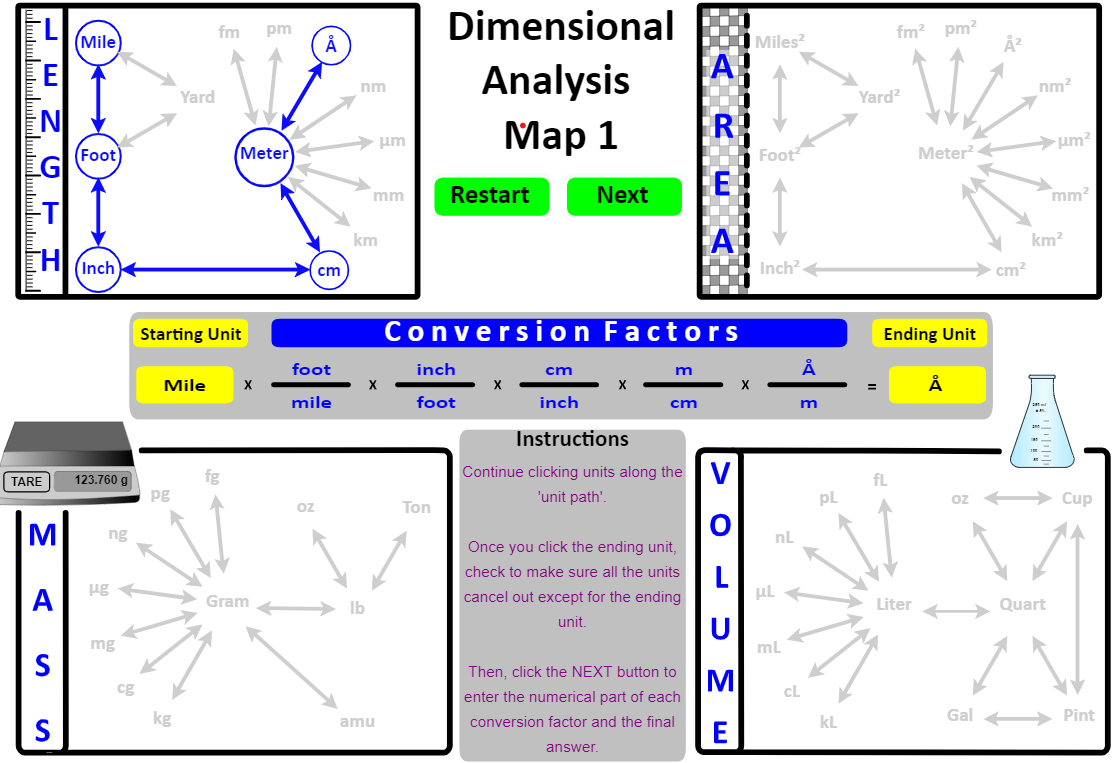
Notice that the units have been "set up" in the middle of the map: it starts with mile and ends with Å and all the units cancel out except Å .
In the "live" implementation, the student would click the Next button to open a web page that has the "numerical part" empty awaiting entry by the student. In the image below, the student has entered everything correctly except the conversion between cm and m.

Items entered incorrectly are displayed back to the student in red . In addition, the correct conversion factor is listed at the bottom of the image in blue text.
Instead of hoping that students create their own "map" of units, this interactive assignment "guides" the student through the process with a map that will get them to their destination. As with any map, the more it is used, the less it needs to be used.
Map 2: Volume, Mass, Density, Moles, Molar Mass, and Atoms
Determine if the problem is asking you to report a numeric answer for a "1-unit" problem or a "2-unit" problem (density (g/mL or g/L) or molar mass (g/mole).
- One Unit
- Click on the starting unit.
- Find a path between the starting unit and ending unit and click the units along the path starting with the one adjacent to the starting unit. This sets up the factor-label part of the dimensional analysis problem.
- In the "live" implementation, the student would click the Next button to open a web page where she would enter the "numerical part" of the conversion factors and the final answer.
- Two Unit: the answer to the problem is density or molar mass.
- Suppose the question said "10.5 pg of a substance has a volume of 65.7 Å3 . What is it's density in ng / L ?".
- Click the Two Unit button - this opens a factor-label method in the numerator AND denominator at the bottom of the Map
- Click on pg - the starting numerator unit.
- Find a path between pg and ng (the ending numerator unit).
- Click the Denominator button and click on Å3 . Find a path between Å3 and L (the ending denominator unit).
- In the "live" implementation, the student would click the Next button to open a web page where she would enter the "numerical part" of the conversion factors and the final answer.
If the units were clicked as described, your map will look like . . . .

Notice that the problem's units have been "set up" at the bottom of the map: pg are converted to ng in the numerator and Å3 are converted to L in the denominator.
Map 3: Molarity and Mole → Mole conversions
Once students learn to balance chemical equations, the molar ratio becomes the conversion factor between two species. The two species can be two elements in a compound or two reactants and/or products in a chemical equation. A measured property of the species on the left is converted into a calculated value for a property of the species on the right.